
Download EasyXviD – video converter, free video converter, convert video, easy video conversion, XviD, AVI, MP4, MKV, MOV
Overview
EasyXviD is a dedicated video conversion tool designed to simplify the process of transforming video files across multiple formats. Its primary purpose is to enable users to convert their media files into widely compatible formats such as XviD, AVI, and MP4, ensuring smooth playback across various devices. This app addresses a common challenge faced by mobile users: the inability to play certain video formats on specific devices due to format incompatibility. By offering a streamlined conversion workflow, EasyXviD helps users maintain a flexible and accessible video library.
The target audience includes individuals managing personal video collections, especially those who frequently transfer media between smartphones, tablets, or older media players. The app is particularly useful for users with older or budget devices that lack support for modern video codecs. Although the developer is listed as the EasyXviD Team, no further details about the organization or its background were provided. The app’s longevity, with a release date of March 4, 2011, indicates a stable, long-running tool that has maintained relevance in the productivity space.
Real-world use cases include preparing videos for playback on legacy devices, sharing media across platforms with differing format requirements, or organizing a video library for consistent compatibility. In the broader app ecosystem, EasyXviD fills a niche for lightweight, no-cost conversion utilities, offering a reliable alternative to more complex or paid software.
Key Features & Functionality
- Wide Format Support: EasyXviD supports conversion from popular video formats including MKV and MOV, allowing users to work with diverse media sources without format restrictions.
- User-Friendly Interface: The app features an intuitive layout that simplifies the conversion process, minimizing technical barriers for beginners and casual users.
- Free Access: All functionalities are available at no cost, making it an accessible option for users seeking a no-fee solution for video conversion.
- Compatible Output Formats: Users can export converted videos in XviD, AVI, and MP4 formats, ensuring broad compatibility with various playback devices and software.
For example, a user with a collection of MOV files from a digital camera can convert them to MP4 for seamless playback on a tablet that doesn’t support MOV natively. Similarly, someone with MKV files from online sources can convert them to AVI for use on older media players. The app’s focus on core conversion tasks ensures efficient processing without unnecessary complexity.
Each feature is designed to enhance usability and accessibility. The wide format support reduces the need for multiple tools, while the free model removes financial barriers. The output format options ensure that converted videos remain usable across a wide range of devices, from smartphones to desktops, making it a practical utility for everyday media management.
Interface, UX & Performance
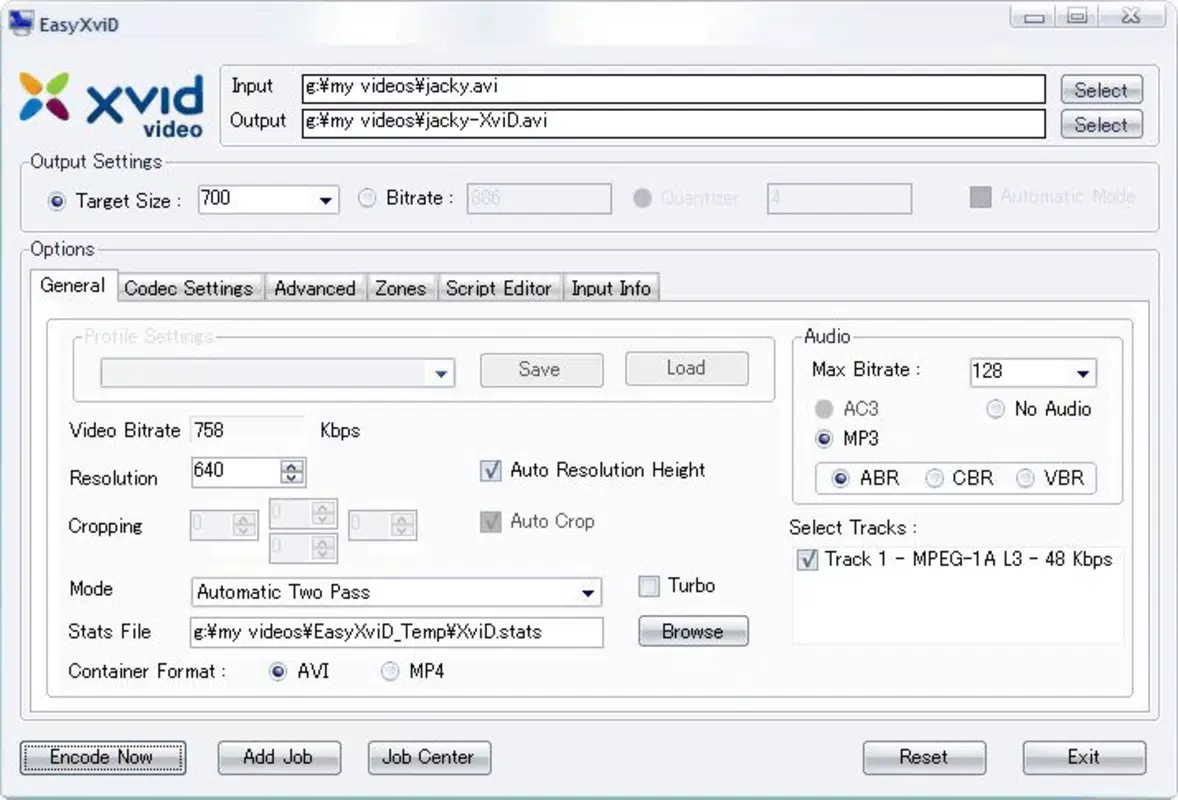
EasyXviD presents a clean, straightforward interface focused on the core function: video conversion. The layout prioritizes essential actions, such as selecting a source file and choosing an output format, with minimal on-screen clutter. Navigation is linear and predictable, guiding users through each step of the conversion process without requiring prior technical knowledge.
The visual style is functional rather than decorative, emphasizing clarity and usability over aesthetic flair. Buttons are clearly labeled, and the workflow is designed to minimize user errors. Although the developer did not list formal performance metrics, the app’s lightweight size of 1.3 MB suggests optimized resource usage, which may contribute to stable performance on older or low-end Android devices.
Responsiveness appears to be consistent, with minimal lag during file selection and conversion initiation. Stability is likely maintained due to the app’s long-standing presence and minimal feature scope. However, specific details about performance under heavy load or on high-end devices were not disclosed. Users should expect a basic, reliable experience focused on conversion efficiency rather than advanced editing or real-time preview capabilities.
Platform Compatibility & Technical Requirements
EasyXviD is available exclusively on the Android platform. The current version is 1.2.3, with a file size of 1.3 MB, indicating a lightweight application that requires minimal storage space. The developer did not specify minimum OS requirements or compatibility details for specific Android versions.
Given the app’s release date in 2011, it is likely compatible with older Android versions, but users should verify device compatibility through official app stores or trusted sources. No information was provided about required permissions, background processing, or network usage during conversion. The app’s small footprint suggests it can run on a wide range of Android devices, including those with limited processing power or memory.
Pros and Cons
Pros
- Completely free to use with no in-app purchases or hidden fees
- Supports conversion from widely used formats like MKV and MOV
- Exports to multiple compatible output formats including XviD, AVI, and MP4
- Lightweight design with minimal storage footprint
- Simple interface suitable for non-technical users
Cons
- Developer did not provide detailed technical specifications or OS requirements
- No information on advanced features such as batch conversion or video editing
- App size and version details suggest limited recent updates
- Compatibility with modern Android devices may be uncertain
- Limited visual feedback during conversion process
FAQ
Is EasyXviD safe to download and install?
Yes, EasyXviD is a free mobile app designed for video conversion. As with any third-party app, it is recommended to download from trusted sources to ensure security and integrity.
Can I convert multiple videos at once?
The app’s functionality does not include batch conversion. Each video must be processed individually.
Does EasyXviD require internet access?
Based on available information, the app appears to operate offline. Conversion is handled locally on the device without requiring network connectivity.
Is EasyXviD compatible with iOS devices?
Currently, EasyXviD is only available for Android. There is no official version for iOS devices.
How often is EasyXviD updated?
Specific update frequency was not provided. The app’s last release was in 2011, which may indicate limited or infrequent updates.
Final Thoughts
EasyXviD remains a functional tool for users seeking a no-cost solution to convert video files between common formats. Its focus on simplicity, combined with support for MKV, MOV, and output formats like XviD, AVI, and MP4, makes it a practical choice for basic conversion needs. While it lacks modern features such as batch processing or advanced editing, its lightweight nature and free access provide value for users managing older media or using budget devices.
For individuals who prioritize affordability, ease of use, and compatibility over advanced functionality, EasyXviD delivers a reliable experience. Its long-standing presence in the Android ecosystem speaks to its stability and continued utility. Although it may not match the capabilities of newer conversion apps, it fills a niche for straightforward, no-frills media management.
Download EasyXviD now


